Nuralis: an AI floating toolkit for on-screen reading and extraction
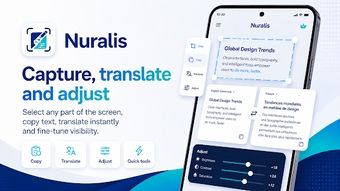
Nuralis, developed by Projy AI, is an Android productivity companion that brings reading, extraction, and translation tools to any active app. It provides a persistent floating interface for magnification, OCR, selective screenshots, and on-screen translation without leaving the foreground. Key capabilities include intelligent zoom, advanced OCR, selective capture, and annotation tools accessible from the overlay. Professionals, students, and power users who handle multilingual documents or restricted-text apps benefit most from the app’s mobile-first workflow enhancements.
What is Nuralis used for in a mobile work session?
Nuralis acts as a persistent overlay that gives quick access to screen-focused helpers while you remain in the app you are using. The floating tool performs magnification for small text, uses OCR to extract visible text, and captures selective screen regions, so professionals can read, copy, and save content without switching away from a browser, PDF reader, or messaging app.
How does Nuralis support core professional output and tasks?
The app targets common information-handling steps that interrupt mobile workflows: reading fine print, copying non-selectable text, and translating passages. Its selective capture and annotation tools let users produce focused screenshots and mark important passages. The integrated translation converts captured text into other languages, making it practical for multilingual document review and quick client-facing clarifications on the device.
Is the interface and learning curve suitable for business users?
The floating interface keeps operations within the active screen, reducing context changes. The app requires standard overlay and media projection permissions to function, which is a one-time setup step. Templates or guided tours are not mentioned, so professionals unfamiliar with overlays may need short exploration time, but the persistent control model preserves workflow once configured.
How does Nuralis handle compatibility, collaboration, and reliability?
The tool is Android-native and works across installed apps thanks to screen-overlay operation and OCR-based text extraction. It supports selective screenshots and annotations that can be exported from the device, which helps integrate captured content into email, document editors, or team messaging. The developer positions the app as lightweight and all-in-one, so it fits devices that accept standard overlay permissions.
Nuralis suits mobile professionals who need quick on-screen extraction
Nuralis is a practical option for professionals who frequently read mixed-language material or must copy text from apps that block selection. Its persistent overlay reduces app switching and supplies magnification, OCR, and translation at the point of need. The trade-off is initial permission setup and a short exploration period to place the floating controls. Use the overlay for targeted captures and annotate before exporting to preserve context in your workflows.